

If you run a custom t-shirt business or are planning to start one, you already know that great designs aren’t enough anymore. Your customers want the freedom to create their own designs, and they expect it to be easy, fun, and fast.
That’s where the right t-shirt design software comes in.
But with so many options out there, it’s easy to feel overwhelmed. You might find yourself wondering, “Which software is best for t-shirt design?” or “How do I pick the best software for my business?”
Don’t worry, you’re not alone. We’ve done the research for you.
In this guide, we’ve rounded up the 10 best t-shirt design software options in 2025 from simple online tools to powerful, full-featured solutions.
Let’s explore your options and help you find the perfect fit for your business.
Table of Contents
10 Best T-Shirt Design Software in 2025 (With Detailed Comparison)
Choosing the right t-shirt design software is important for any custom apparel business. Whether you’re a small shop, large-scale printer, or influencer selling merch, your choice of tool can directly impact your customer experience, production speed, and profit margins.
Here’s our expert analysis of the 10 best t-shirt design software solutions in 2025, based on functionality, scalability, ease of use, and business value.
1. DesignNBuy
DesignNBuy is a powerful all-in-one t-shirt design software built for print businesses, apparel businesses, and eCommerce stores.
Trusted by print providers worldwide from startups to large-scale production houses, this AI-powered design tool transforms how you create, sell, and fulfill custom t-shirt orders.
With an easy-to-use design studio, automated order workflows, and seamless integration with major eCommerce platforms, you can offer personalized products and manage production effortlessly.
Key Features:
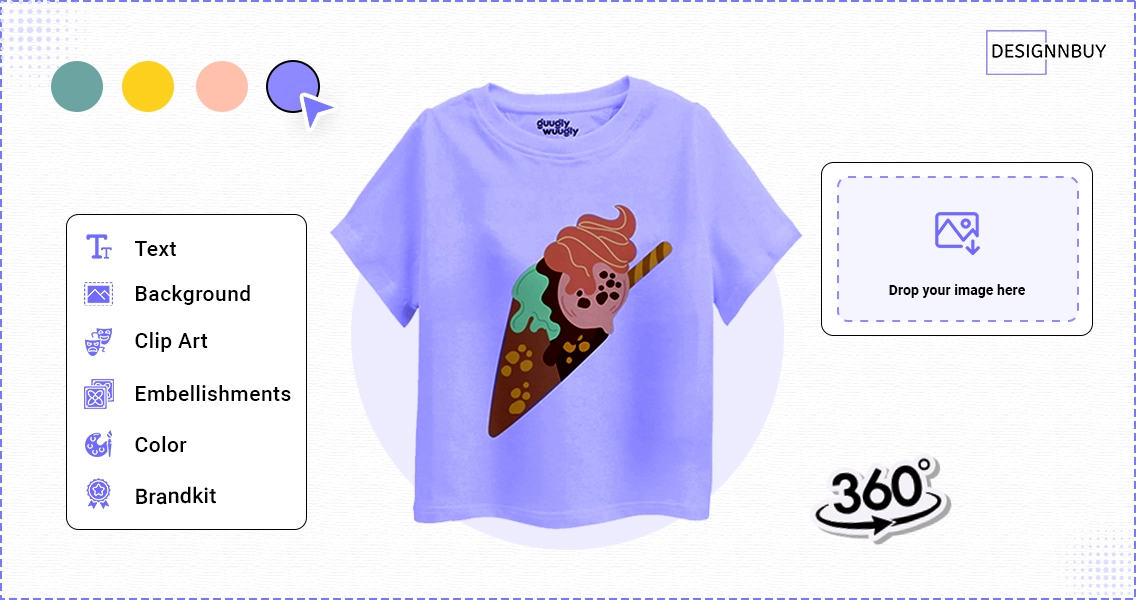
- Online T-Shirt Design Tool: Drag-and-drop editor with support for text, clipart, images, artwork uploads, QR codes, and vector graphics
- Advanced Product Configurator: Supports layered editing, dynamic product variations, flexible pricing rules, and advanced features like 3D preview and multi-side design; compatible with various printing methods such as DTG, screen printing, embroidery, sublimation
- Mobile-Responsive Design Studio: Works seamlessly on smartphones, tablets, and desktops
- Print-Ready File Generation: Automatically produces vector-based, high-resolution files for production
- eCommerce Integrations: Pre-built plugins for Shopify, WooCommerce, Magento, and more
- Order & Workflow Automation: In-built prepress checks, order routing, multi-vendor support, and production tracking
- Multi-Language & Multi-Currency: Supports global operations with localized storefronts
Pros:
- All-in-one solution for design, ordering, production, and storefront
- Highly customizable for B2B, B2C, and wholesale models
- Scalable from startup to enterprise-level operations
- Provides full ownership of your platform and customer data
Cons:
- Initial setup requires configuration and training (DesignNBuy offers onboarding assistance)
- Higher investment compared to basic tools, but delivers long-term ROI
Ideal For:
Print service providers, trade printers, promotional product distributors, and apparel decorators seeking a scalable, end-to-end solution.
Verdict:
DesignNBuy is the most comprehensive and scalable custom t-shirt design software in 2025, ideal for tshirt printing business ready to grow and automate their business.
2. TeeSpring (Spring)
TeeSpring, now known as Spring, is an online t-shirt design software designed for creators and influencers who want to monetize their audience through custom merch.
Key Features:
- Drag-and-drop design tool for simple product creation
- Print-on-demand fulfillment, shipping, and customer service handled by Spring
- Direct integrations with YouTube, Instagram, TikTok, and Twitch for merch promotion
Pros:
- Zero upfront investment, only pay per sale
- Simple, user-friendly design interface
- Perfect for creators with existing social media followings
Cons:
- Limited control over profit margins (platform fees apply)
- Restricted to Spring’s catalog and fulfillment process
- No backend production or order customization
Ideal For:
Influencers, content creators, and hobbyists looking to sell merch without managing production.
Verdict:
Best for creators seeking hassle-free merch sales with built-in social media tools.
3. Customily
Customily specializes in product personalization and is well-suited for online shops that thrive on custom gifts and unique apparel designs.
Key Features:
- Live product personalization with text, images, and map locations
- Real-time 3D previews for customers
- Compatible with Shopify, WooCommerce, BigCommerce, and others
Pros:
- Increases conversion rates with live previews
- Excellent for print-on-demand businesses focused on personalization
- Simple to install on most eCommerce platforms
Cons:
- Subscription fees can grow as your sales scale
- Limited beyond eCommerce integrations (no production or fulfillment tools)
Ideal For:
Online stores offering personalized apparel, corporate gifts, and accessories.
Verdict:
Excellent for businesses focused on deep personalization and custom product previews.
4. InkXE
InkXE is an advanced, enterprise-level t-shirt design tool that offers deep customization and product configuration capabilities for complex print operations.
Key Features:
- Supports multiple decoration methods: DTG, screen printing, embroidery, sublimation
- Multi-device responsive design tool
- Wholesale and B2B pricing structures
- Bulk order management and production automation
Pros:
- Tailored for high-volume and enterprise print environments
- Extremely versatile for complex apparel decoration
- Supports advanced product customization
Cons:
- Steep learning curve and complex setup
- Higher cost with custom pricing plans
- Requires technical resources for implementation
Ideal For:
Large printing companies, trade printers, and wholesalers with high production needs.
Verdict:
Ideal for large-scale apparel decorators seeking deep customization, automation, and B2B features.
5. Adobe Illustrator
Adobe Illustrator remains the industry-standard for professional graphic designers creating intricate t-shirt designs and illustrations.
Key Features:
- Advanced vector design tools with unlimited scalability
- Comprehensive typography and illustration capabilities
- Supports Pantone colors and print-ready formats
- Integrates with Adobe Photoshop and other Creative Cloud apps
Pros:
- Superior creative freedom and precision
- Ideal for professional-grade artwork and complex designs
- Global design community with tutorials and plugins
Cons:
- No direct eCommerce or production tools
- Requires significant design experience
- Monthly subscription required
Ideal For:
Graphic designers and artists creating original artwork for print production.
Verdict:
Best for creating professional, high-detail vector artwork for apparel printing.
6. DecoNetwork
DecoNetwork is a robust platform that combines online product design, business management, and production tracking.
Key Features:
- Product designer with real-time visual previews
- Order management, production workflow, and supplier integration
- Comprehensive reporting and customer management tools
Pros:
- Centralizes design, order, and production processes
- Strong tools for job tracking and supplier coordination
- Scales well for mid-sized print shops
Cons:
- User interface may feel dated compared to newer solutions
- Requires some training to utilize its full potential
Ideal For:
Mid-sized to large print shops looking for a fully integrated eCommerce and production platform.
Verdict:
A strong choice for shops needing robust production automation alongside product customization.
7. CorelDRAW Graphics Suite
CorelDRAW offers professional-grade graphic design tools at a competitive price, making it a solid alternative to Adobe for t-shirt design.
Key Features:
- Vector illustration, page layout, and image editing tools
- Advanced color management and prepress support
- Supports embroidery design with add-ons
Pros:
- One-time purchase option available (perpetual license)
- Compatible with many embroidery and printing workflows
- Less steep learning curve compared to Illustrator for some users
Cons:
- Lacks integrated eCommerce and online product design features
- Limited third-party integrations for web-to-print
Ideal For:
Designers who need a powerful desktop design solution without monthly fees.
Verdict:
A great choice for professional apparel designers seeking a powerful offline graphic design tool.
8. Canva
Canva offers an intuitive, drag-and-drop design platform suitable for beginners who want to create simple t-shirt designs quickly.
Key Features:
- Pre-built templates for apparel designs
- Simple interface with stock photos, fonts, and elements
- Direct download of print-ready files
Pros:
- Extremely easy to use, even for complete beginners
- Free and affordable paid plans
- Great for mockups and basic merch designs
Cons:
- Limited customization for advanced printing needs
- No integrated order management or storefront features
Ideal For:
Beginners, hobbyists, and social media creators testing design ideas.
Verdict:
Best for non-designers who need a fast, easy tool for simple t-shirt designs.
9. Lumise
Lumise is a lightweight, HTML5-based t-shirt design software online that integrates with most major eCommerce platforms.
Key Features:
- Modern design editor with text, images, clipart, and effects
- Supports SVG export and vector-based print files
- Compatible with Shopify, WooCommerce, and others
Pros:
- Affordable one-time license option
- Easy integration with popular eCommerce platforms
- Smooth user experience for customers
Cons:
- No built-in production or order automation tools
- Limited scalability for large shops
Ideal For:
Small to medium-sized eCommerce stores looking for easy customization features.
Verdict:
Best for small businesses needing a plug-and-play online t-shirt design tool.
10. LiveArt HTML5 Designer
LiveArt HTML5 Designer focuses on real-time t-shirt customization, offering a rich toolset for online stores.
Key Features:
- Online designer with live product preview
- Mobile-friendly, responsive design studio
- Supports complex pricing structures for customizations
Pros:
- Flexible customization with live pricing updates
- Supports a wide range of product categories beyond t-shirts
- Works well for B2B and B2C setups
Cons:
- Requires technical integration for full use
- Monthly subscription required
- Limited built-in storefront or eCommerce features
Ideal For:
Mid-sized stores that need advanced customization with pricing flexibility.
Verdict:
Great for shops wanting a highly customizable product designer with dynamic pricing capabilities.
Don’t wait—start growing with DesignNBuy today! Book a Demo
| Design Tool | Best For | Key Highlights |
|---|---|---|
| DesignNBuy | T-shirt businesses, merchandise brands, and corporate gift companies looking to scale and automate | AI powered t-shirt design tool with advanced features for order management, production automation, and seamless eCommerce integration. It scales effortlessly and supports complex product personalization, multi-storefront setups, and global operations. |
| TeeSpring (Spring) | Creators, influencers, and merch sellers | Print-on-demand platform with zero upfront costs; simple drag-and-drop design editor; social media integrations. |
| Customily | Online t-shirt shops, merch stores, and personalized gift sellers | Live personalization with real-time product previews; ready-to-use templates; integrates with Shopify, WooCommerce, and more. |
| InkXE | Large-scale t-shirt manufacturers, enterprise-level apparel businesses, and wholesale merch suppliers | Supports multiple decoration methods (embroidery, DTG, sublimation); bulk ordering and B2B pricing; advanced customization. |
| Adobe Illustrator | Graphic designers and creative professionals creating high-end t-shirt artwork | Advanced vector editing and typography tools; ideal for detailed, print-ready designs; requires strong design skills. |
| DecoNetwork | Mid to large apparel businesses, corporate merch sellers, and fulfillment centers | Combines product design with backend business tools like order tracking, production workflow, and supplier integration. |
| CorelDRAW | Professional t-shirt designers and merch businesses wanting offline design tools | Advanced vector graphics suite; great for embroidery and screen-printing artwork; offers both perpetual license and subscription options. |
| Canva | Hobbyists, social media creators, and small t-shirt shops | Extremely easy drag-and-drop editor with templates for quick designs; great for mockups and basic merch designs. |
| Lumise | Small to mid-sized t-shirt sellers and eCommerce stores | HTML5-based online designer; includes text effects, clipart, and SVG exports; simple eCommerce integrations. |
| LiveArt HTML5 | Growing custom merch shops, corporate gift stores, and promotional product businesses | Online designer with live product previews and dynamic pricing; mobile-friendly; flexible customization options. |
Choosing the Best T-Shirt Design Software: 6 Key Factors to Consider
Before investing in any t-shirt design software, it’s essential to evaluate your options carefully. From pricing to technical capabilities, several factors will influence your decision. Here’s what you should consider to make the right choice for your business:
1. Cost
Pricing can vary greatly among t-shirt design tools. Some software solutions offer free versions or affordable monthly subscriptions, while others require a higher upfront investment or annual plans. Beyond the listed price, think about long-term costs such as upgrades, add-ons, or extra features. It’s important to choose a solution that not only fits your current budget but also scales with your business as it grows.
2. Ease of Use
User-friendliness is a important factor, especially if you or your customers are not professional designers. Some tools offer simple drag-and-drop interfaces that anyone can use, while others are packed with advanced features suited for experienced designers—but may come with a steeper learning curve. Consider whether the software provides tutorials, onboarding guides, or a smooth learning experience that matches your team’s skill level.
3. Design Capabilities
The design features offered can vary from basic text and image placements to advanced vector editing and multi-layer designs. Some tools support high-resolution print-ready files for production, while others may only be suitable for basic visuals or social media mockups. Make sure the software aligns with your intended printing method, whether it’s screen printing, DTG, sublimation, or embroidery.
4. Templates & Design Resources
Templates and design resources can save significant time during the creation process. Many platforms offer pre-made templates for t-shirts, clipart libraries, and typography collections that simplify design creation. If you frequently create new designs or want to offer quick customization for customers, prioritize tools with a rich library of templates, graphics, and mockups.
5. Integrations & Compatibility
Integrations play a vital role in simplifying your print workflow. Some t-shirt design software integrates with popular eCommerce platforms like Shopify, WooCommerce, or Magento, allowing direct product publishing. It’s also important to check compatibility with your operating system, devices, and the file formats you work with. A tool that seamlessly fits into your existing tech stack can save a lot of time and effort.
6. Customer Support
Customer support can make or break your experience, especially during technical issues or urgent projects. Free tools often rely on community forums or basic documentation, whereas paid tools may offer dedicated support through live chat, email, or phone. Consider how accessible and responsive the support team is, and whether the software offers onboarding assistance or priority support for businesses.
To sum up
Choosing the right t-shirt design software isn’t just about picking a tool but it’s about the growth opportunities for your business. The right software can help you attract more customers, boost your sales, streamline daily operations, and deliver a smoother, more enjoyable buying experience.
Whether you’re looking for flexibility, scalability, or print-ready design precision, the options we’ve covered offer something for every kind of business.
If you’re searching for an all-in-one solution designed specifically for print businesses, DesignNBuy stands out as a top choice. With advanced customization features, mobile-friendly design tools, and seamless order management, it’s everything you need to grow your custom apparel business, boost conversions, and increase sales in 2025 and beyond.
Ready to Take Your T-Shirt Business to the Next Level?
Talk to our experts and explore how our t-shirt design solutions can help you grow faster
Best T-Shirt Design Software FAQs
Which software is best for t-shirt design?
The best software for t-shirt design depends on your business needs. If you want an all-in-one solution that handles everything from customer design to order management and production, look for comprehensive t-shirt design software that also integrates with your eCommerce store and automates workflows.
What is t-shirt design software?
T-shirt design software is a digital tool that allows you or your customers to create custom t-shirt designs. It typically includes features like text editing, clipart, image uploads, templates, and design previews. Advanced software also offers print-ready file generation, product configurators, and integration with order and production systems.
How does online t shirt design software work?
Online t shirt design software works through a web-based design studio where users can create and personalize their t-shirt designs directly on your website. Once the design is finalized, the software can automatically generate production-ready files, send orders to fulfillment, and track order statuses, saving time and reducing manual errors.
Can I integrate t-shirt design software with my online store?
Yes, many t-shirt design software solutions are built to integrate with popular eCommerce platforms such as Shopify, WooCommerce, Magento, and others. This allows your customers to design their products online, place orders seamlessly, and enables you to manage everything from one centralized system.
What features should I look for in custom t shirt design software?
Key features to look for include an intuitive design editor, mobile responsiveness, product configurators, print-ready file generation, automated order and production workflows, and strong eCommerce integrations. Scalability and customization options are also important if you plan to expand your product offerings.
Is t-shirt design software easy to use for customers?
Most modern t-shirt design software solutions are designed to be user-friendly, offering drag-and-drop editors and mobile-friendly interfaces. However, ease of use may vary by platform. It’s a good idea to choose a tool that allows you to customize the interface for your audience and provides tutorials or guides if needed.
Why should I invest in t-shirt design software for my business?
Investing in t-shirt design software allows you to offer personalized products, attract more customers, and streamline operations. With the right tool, you can automate design approvals, minimize manual errors, and boost overall efficiency, which ultimately increases sales and customer satisfaction.